Lessons from shipping real systems with AI-generated code
AI can generate code faster than you can understand it. That's the problem.
I usually realize things have gone wrong late at night. Tests are green. The house is quiet. I'm rereading the same function for the third time, and I can't explain why it exists without scrolling. That's when I know the code got ahead of me — not because it's bad, but because I let something else drive for too long.
By the time I noticed, starting over felt cheaper than fixing what I had.
I'm not an AI expert. I'm a senior engineer with about eight years of experience and enough failed projects to recognize that pattern when it shows up.
After repeating that mistake enough times, a few hard rules emerged. Not theory. Just constraints that kept me in control while still letting AI be useful. I ended up using them end-to-end in an app I rely on every day — the code is public.
The rules:
- Enforce clean architecture — hard boundaries AI can't blur
- Model the domain first — use AI to think, not build
- Build outward — ports, in-memory adapters, then real infrastructure last
- Write decisions down — ADRs keep you and AI aligned over time
- Test the domain, lint everything — AI can pass tests and still write unmaintainable code
- Control the feedback loop — describe behavior first, tighten tests, never let existing tests break
Rule #1: Enforce Clean Architecture or Don't Bother
If you don't enforce clear, hard boundaries early, AI will quietly wreck your project for you.
AI can generate far more code than you can reason about, and that flips the usual bottleneck.
Typing stops being the issue. Comprehension becomes the problem.
When there aren't hard boundaries, everything starts bleeding into everything else. Logic drifts. Responsibilities blur. Small changes get risky. Eventually, the project becomes something you don't want to touch.
The structure that's held up best for me is hexagonal architecture. Not because it's trendy or elegant, but because it makes it hard to mix concerns — even when code is being generated faster than you can read it.
I used to think it was overkill. Too many files. Too much ceremony. What changed wasn't team size. It was output. When AI enters the picture, "less code" stops being the main goal. Understanding does. And strict boundaries turn out to be the cheapest way to buy that back.
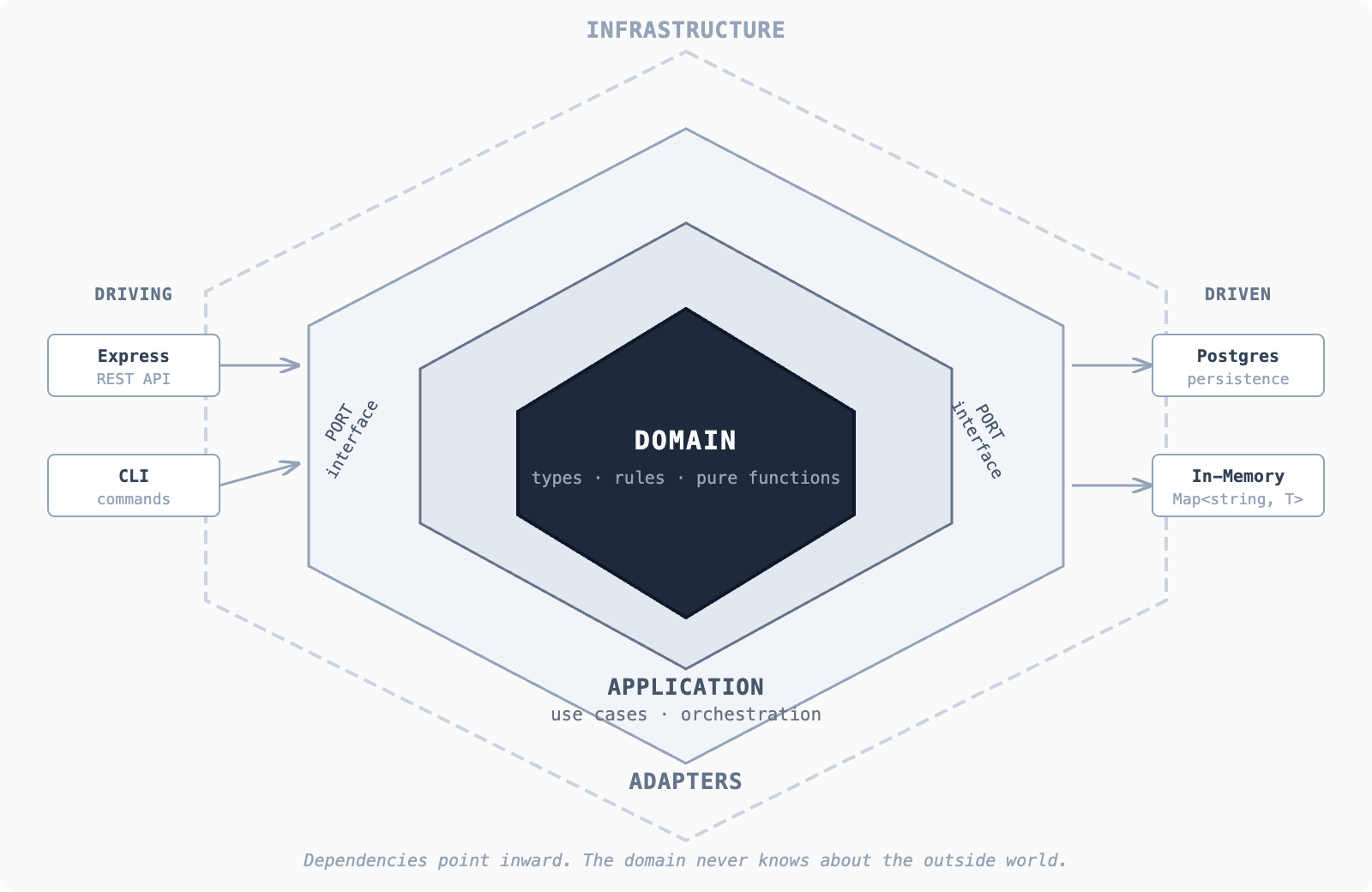
Everything that follows builds on this.
Rule #2: Model the Domain First — With AI's Help
At this stage, I'm not asking AI to build anything. I'm using it to help me think clearly — and name things correctly. This is one of the few prompts I actually reuse:
I'm building a system that does X.
Ignore frameworks, databases, and infrastructure.
Help me identify:
- The core concepts in the system
- The data those concepts need
- The rules that must never be broken
- What goes in and what comes out
Respond using plain TypeScript interfaces and pure functions.
No side effects.
The goal isn't completeness. It's clarity. If you get the names wrong here, everything downstream gets harder. If you get them mostly right, the rest of the system tends to fall into place.
What comes back is pure domain logic — types, rules, and constraints with no IO, no frameworks, nothing that depends on the outside world. You already know more about your system here than most projects do after weeks of setup.
Rule #3: Build From Domain Outward — Ports, Adapters, and In-Memory First
Once the domain is clear, the next question is simple: what does this logic need from the outside world? Not how it gets it. Just what. Things like saving and loading data, getting the current time, generating IDs, sending notifications.
These needs become ports — contracts where the domain says "I need this to exist, but I don't care how you do it." A port is just an interface. No SQL, no ORM, no database client.
Then you write the dumbest possible adapter: in-memory. A Map<string, T>. This is boring on purpose. It lets you run the system immediately, keeps feedback loops short, and gives AI something safe to refactor without touching real data. It proves the architecture works before you've committed to anything expensive.
The application layer sits between domain and adapters. It doesn't contain business rules — it just strings steps together. Load something. Check it exists. Apply a rule. Save the result.
This code knows when things happen, not why they're allowed.
Wire it all up in main.ts — the only file allowed to know about concrete implementations. Try to break it before you add a real database. If something feels unclear now, adding Postgres won't fix it — it will just bury the problem. Once you're confident, swap in a real adapter. Nothing else should change.
(For the full working example — domain, ports, adapters, application layer — see the repo.)
Rule #4: Write Decisions Down or Expect Chaos
If you don't write decisions down, you'll argue with your past self later. Or worse — with an AI that has no idea why something exists.
I keep a .adr/ folder at the root of every repo. Any meaningful architectural decision gets a short markdown file:
# ADR-003: Use in-memory adapter for first pass

## Decision
All new features start with an in-memory adapter before
adding a real database implementation.

## Why
Keeps feedback loops short. Proves the domain logic works
before committing to infrastructure. Easier for AI to
refactor safely.

## Tradeoffs
Delays real persistence work. Requires a swap step later.
Worth it — we've caught three domain modeling mistakes
this way that would have been buried in SQL.
When AI suggests a change that contradicts a past decision, you can point at the file. When you're tempted to cut a corner at midnight, the ADR reminds you why you didn't cut it last time.
Rule #5: Test the Domain Hard, Lint Everything Else
AI is fast. It's also very good at being slightly wrong. Tests are how you keep it honest.
The domain gets the most coverage. No mocks. No IO. Just the rules, exercised directly. If AI breaks a domain test, that's a hard stop. I've had AI "refactor" a validation function and silently change the behavior. The domain tests caught it. If those tests hadn't been there, I would've shipped it.
But tests alone aren't enough. AI can pass your tests and still produce code that's impossible to maintain — wrong names, tangled dependencies, inconsistent patterns. You need linting with teeth, and you need it running automatically.
Pick a strict ruleset. Run it locally. Run it in CI. If it fails, the work isn't done. I don't care if the feature works perfectly — if the linter is red, it doesn't ship.
Rule #6: Control the AI Feedback Loop
Here's what's worked for me: I describe the behavior I want first — explicitly, before any code gets written. Then I let AI take a pass at implementing it, including tests.
The first round is usually wrong in small ways. Off-by-one in the logic. Tests that assert the wrong thing. So I tighten the tests until they actually match what I meant, not just what AI guessed.
Two rules after that: tests must pass, and existing tests never break. If AI can't meet both, I roll back and re-prompt. No exceptions.
The Part I Don't Love Admitting
Letting AI run feels good. Watching files appear, functions fill in, edge cases get handled — it scratches the same itch as rapid prototyping used to, except faster and quieter. You tell yourself you'll come back and clean it up. Most of the time, that's a lie you don't catch until later.
I still mess this up. I still catch myself reading code that technically makes sense but doesn't feel owned yet. The difference now is that I notice sooner. When something feels slippery, I stop. I cut it back to the domain. It's annoying. It's slower. It's also cheaper than losing two days to a system I don't trust.
The AI didn't wreck the project. I did, by not staying in the driver's seat.